Image Nano Banana Pro
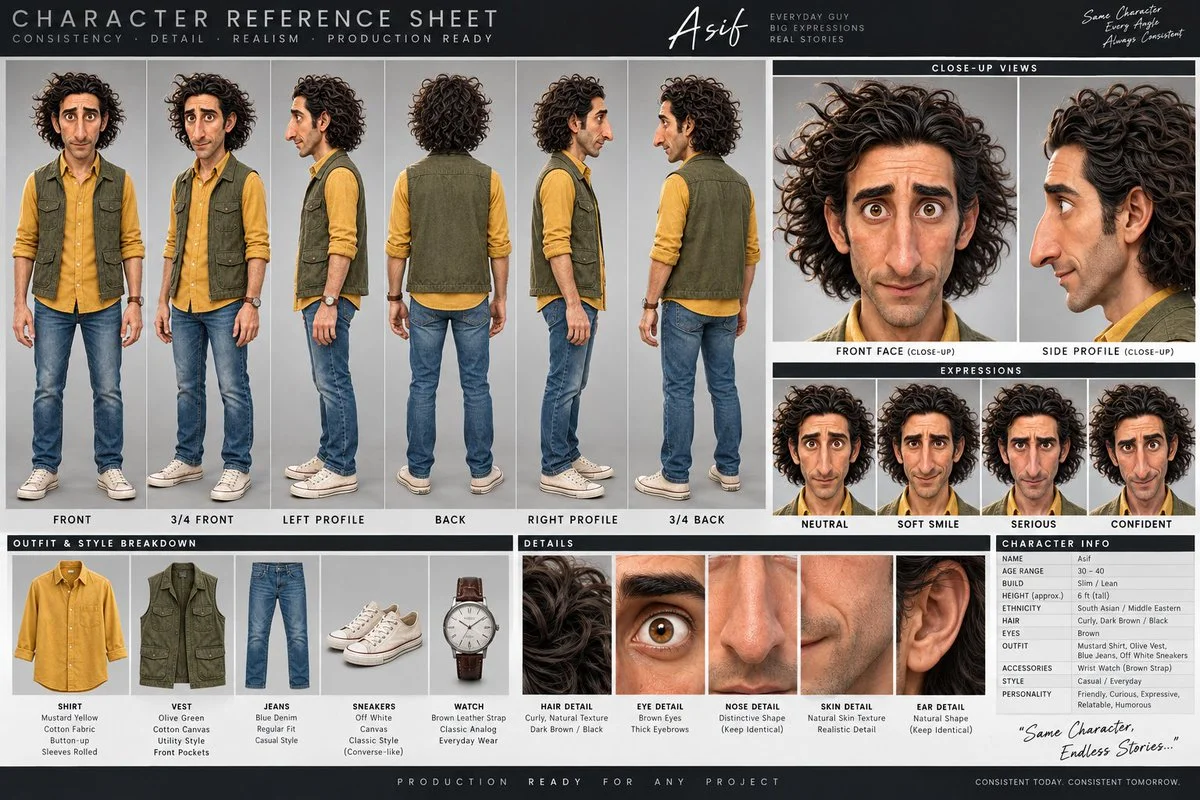
Professional character reference sheet for film and animation preproduction
A clean, multi-panel sheet with front, 3/4, and profile views, locking facial identity and proportions for cinematic continuity.
Prompt
@Create image

PROFESSIONAL CHARACTER REFERENCE SHEET
CONSISTENCY • DETAIL • REALISM • PRODUCTION READY

==================================================
INPUT REFERENCES
==================================================

CHARACTER REFERENCE IMAGE:
[ATTACH PERSON REFERENCE IMAGE]

CHARACTER NAME:
[OPTIONAL — ENTER NAME]

REFERENCE STYLE:
Use the attached reference character sheet as the
visual inspiration for layout, presentation, and
production-oriented design.

==================================================
CORE OBJECTIVE
==================================================

Transform the uploaded person reference image into
a professional, production-ready CHARACTER REFERENCE
SHEET similar to a high-end film, animation, and
AI video production character design document.

The uploaded reference image is the PRIMARY SOURCE
OF TRUTH for the character's identity.

Preserve the person's recognizable facial identity,
facial structure, hairstyle, skin tone, body proportions,
and other visible characteristics.

Do not randomly redesign the character.

Create a visually consistent character sheet that
can be used for AI image generation, AI video creation,
storyboarding, animation, filmmaking, and cinematic
character continuity.

==================================================
1. CHARACTER IDENTITY LOCK
==================================================

Maintain the SAME CHARACTER throughout every panel.

Preserve:

- Facial structure and proportions
- Face shape
- Eyes and eye color
- Nose shape
- Lips and mouth structure
- Eyebrow shape
- Hairstyle, hair texture, and hair color
- Skin tone and natural skin details
- Body proportions and build
- Distinctive facial features
- Age appearance
- Overall recognizable identity

Do not change the person's identity between views.

No face swapping.
No random hairstyle changes.
No inconsistent facial proportions.
No unnecessary beautification.
No different character in different panels.

==================================================
2. CHARACTER PRESENTATION
==================================================

Create a clean, premium, professional character
reference sheet with a neutral studio background.

Use a realistic, high-detail visual style with
professional studio lighting and consistent rendering.

The character should appear natural, believable,
and production-ready.

Use a clear multi-panel layout with organized sections,
thin panel dividers, professional typography,
and a polished cinematic design.

Maintain consistent lighting, camera perspective,
and visual quality across all panels.

==================================================
3. FULL BODY CHARACTER VIEWS
==================================================

Create a large full-body reference section featuring:

1. FRONT VIEW
   - Straight-facing full-body pose
   - Natural standing position

2. 3/4 FRONT VIEW
   - Three-quarter angle
   - Clear visibility of face and body

3. LEFT PROFILE VIEW
   - Complete left-side profile
   - Accurate facial silhouette

4. BACK VIEW
   - Full back view
   - Accurate hairstyle and clothing details

5. RIGHT PROFILE VIEW
   - Complete right-side profile
   - Consistent facial structure

6. 3/4 BACK VIEW
   - Three-quarter rear angle
   - Consistent outfit and proportions

All views must represent the EXACT SAME PERSON.

Keep the outfit, hairstyle, body shape, and
character identity consistent in every view.

Use full-body framing, ensuring the head,
feet, and entire outfit are visible.

==================================================
4. CLOSE-UP FACIAL VIEWS
==================================================

Create a dedicated CLOSE-UP VIEWS section.

Include:

- FRONT FACE CLOSE-UP
- LEFT OR RIGHT SIDE PROFILE CLOSE-UP

Show detailed facial features, natural skin texture,
hair details, and accurate facial proportions.

Maintain the same identity as the full-body views.

Use professional portrait lighting and a clean
studio background.

==================================================
5. FACIAL EXPRESSIONS
==================================================

Create an EXPRESSIONS section featuring the
same character with consistent identity.

Include four distinct expressions:

1. NEUTRAL
   Natural relaxed facial expression.

2. SOFT SMILE
   Subtle, friendly, natural smile.

3. SERIOUS
   Focused, serious facial expression.

4. CONFIDENT
   Calm, confident, self-assured expression.

Keep the same facial structure, hairstyle,
skin tone, and character identity in every expression.

Expressions should be natural and believable,
not exaggerated or cartoonish unless requested.

==================================================
6. OUTFIT & STYLE BREAKDOWN
==================================================

Create an OUTFIT & STYLE BREAKDOWN section.

Display individual clothing and accessory
reference panels where clearly visible.

Include:

- SHIRT / TOP
- JACKET / VEST / OUTERWEAR
- PANTS / JEANS
- SHOES
- WATCH OR ACCESSORIES
- OTHER IMPORTANT CLOTHING DETAILS

Extract the actual outfit from the reference image.

Show clothing materials, colors, textures,
stitching, pockets, buttons, and relevant details.

Do not invent major clothing items that are
not visible in the reference.

If any item is unclear, preserve its general
appearance rather than inventing inaccurate details.

==================================================
7. CHARACTER DETAIL PANELS
==================================================

Create a DETAILS section containing close-up
reference panels of important character features.

Include, where applicable:

- HAIR DETAIL
- EYE DETAIL
- NOSE DETAIL
- SKIN DETAIL
- EAR DETAIL
- OTHER DISTINCTIVE FEATURES

Show realistic skin texture, hair strands,
eye details, and facial characteristics.

Preserve the original person's distinctive features.

Avoid excessive retouching, artificial skin,
plastic appearance, or unnecessary alterations.

==================================================
8. CHARACTER INFORMATION
==================================================

Add a clean CHARACTER INFO panel on the right side
or another suitable location.

Include only information that can be reasonably
determined from the reference or user-provided inputs.

Possible fields:

NAME: [Character Name]
AGE RANGE: [If provided or reasonably estimated]
BUILD: [Visible body type]
HEIGHT: [Only if provided]
HAIR: [Visible hair description]
EYES: [Visible eye color]
OUTFIT: [Clothing description]
ACCESSORIES: [Visible accessories]
STYLE: [Casual / Formal / Cinematic / etc.]
PERSONALITY: [Only if provided by the user]

Do not present uncertain personal details as facts.

==================================================
9. VISUAL DESIGN & LAYOUT
==================================================

Create a premium cinematic character reference sheet.

Layout requirements:

- Wide horizontal presentation
- Large full-body views on the left
- Close-up views on the upper right
- Expressions below close-ups
- Outfit breakdown along the bottom
- Character details and information panels
- Clear section headers
- Consistent spacing and alignment
- Thin professional dividers
- Neutral studio background
- High-quality editorial presentation

Design inspiration:
Professional film production documents,
high-end character design sheets,
cinematic concept art presentations,
and realistic AI production reference sheets.

Use a sophisticated visual hierarchy.

Do not overcrowd the layout.

Ensure every panel is clear and readable.

==================================================
10. TYPOGRAPHY & TEXT
==================================================

Add professional section titles such as:

CHARACTER REFERENCE SHEET
CONSISTENCY • DETAIL • REALISM • PRODUCTION READY
CLOSE-UP VIEWS
EXPRESSIONS
OUTFIT & STYLE BREAKDOWN
DETAILS
CHARACTER INFO

Use clean, premium, modern typography.

Ensure text is correctly spelled and readable.

Do not include random letters, gibberish,
unnecessary text, or inaccurate labels.

Only add character information that is provided
or reasonably supported by the reference.

==================================================
11. REALISM & QUALITY CONTROL
==================================================

The final character sheet must maintain:

- Consistent character identity
- Accurate facial proportions
- Consistent hairstyle
- Consistent clothing
- Realistic anatomy
- Natural skin texture
- Physically believable body proportions
- Consistent lighting
- Sharp and detailed rendering
- Professional studio-quality presentation
- Production-ready visual clarity

Avoid:

- Identity drift
- Different faces between panels
- Extra fingers or limbs
- Distorted anatomy
- Random accessories
- Inconsistent clothing
- Artificial-looking skin
- Cartoonish facial features
- Blurry details
- Incorrect view labels
- Unreadable text

==================================================
12. PRODUCTION PURPOSE
==================================================

Design this reference sheet for use in:

- AI Video Generation
- AI Image Generation
- Character Consistency
- Cinematic Storytelling
- Film Production
- Animation
- Storyboarding
- Commercials
- Short Films
- Social Media Content

The final output should function as a reliable
visual reference for recreating the SAME CHARACTER
across different scenes, camera angles, expressions,
outfits, and cinematic environments.

==================================================
13. FINAL OUTPUT
==================================================

Generate ONE COMPLETE, PROFESSIONAL CHARACTER
REFERENCE SHEET containing all major sections.

Prioritize character identity, consistency,
visual clarity, realistic details, and professional
production-oriented presentation.

Make the result look like a premium cinematic
character design document.

RESOLUTION LOCK:
Generate the final image in 16K resolution —
15360 × 8640 pixels (≈132.7 million pixels),
16:9 aspect ratio.

FINAL QUALITY:
Ultra-realistic, high-detail, professional
cinematic character reference sheet.
Published: September 16, 2026 by M. Asif